
CAN Bus Usage
The MCP2515 CAN controller on the RS485 CAN HAT communicates over the SPI bus and presents itself as a standard SocketCAN network interface to Linux. Once the kernel driver is loaded, all the familiar ip link and can-utils commands work exactly as they would with any other CAN adapter.
Prerequisites
Section titled “Prerequisites”Before working with CAN, make sure you have completed the Setup & Installation steps. In particular, the SPI overlay for the MCP2515 must be enabled in /boot/config.txt (or /boot/firmware/config.txt on newer Raspberry Pi OS images), and the Pi must have been rebooted after those changes.
Bring Up the CAN Interface
Section titled “Bring Up the CAN Interface”-
Set the bitrate and bring the interface up. The bitrate must match whatever is on the other end of the bus. Common rates are 125000, 250000, 500000, and 1000000 bps.
Terminal window sudo ip link set can0 up type can bitrate 1000000 -
Increase the transmit queue length (optional, but recommended for sustained traffic).
Terminal window sudo ifconfig can0 txqueuelen 65536 -
Confirm the interface is up.
Terminal window ifconfig can0You should see
can0listed withUP RUNNING.
Quick Test with can-utils
Section titled “Quick Test with can-utils”The can-utils package ships the two most useful tools for quick sanity checks: candump (receive) and cansend (transmit).
sudo apt-get install can-utilsOpen two terminals (or two SSH sessions). In the first, start listening:
candump can0In the second, send a single frame:
cansend can0 000#11.22.33.44The first terminal should print the received frame. If you have a second CAN device on the bus, candump will display frames from that device as well.
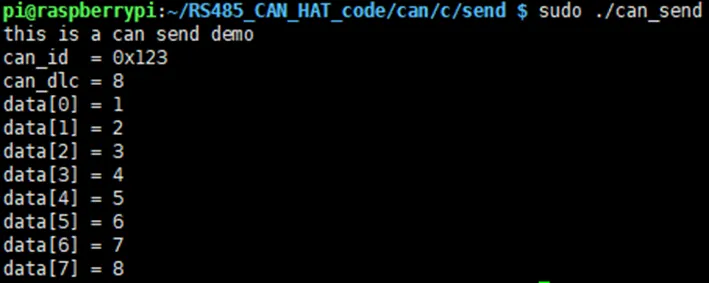
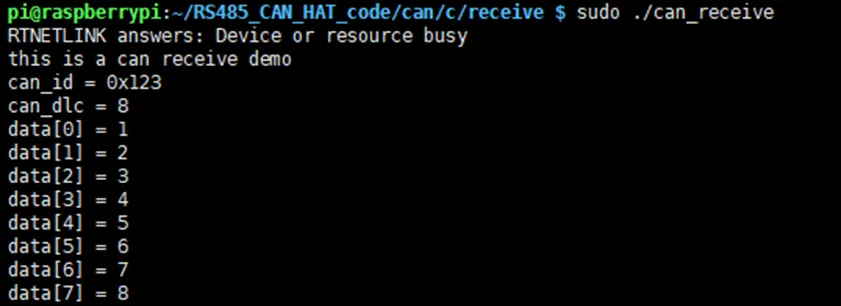
Python Example
Section titled “Python Example”Install the python-can library:
pip3 install python-canimport osimport can
os.system('sudo ip link set can0 type can bitrate 100000')os.system('sudo ifconfig can0 up')
can0 = can.interface.Bus(channel='can0', bustype='socketcan')
msg = can.Message( arbitration_id=0x123, data=[0, 1, 2, 3, 4, 5, 6, 7], is_extended_id=False,)can0.send(msg)print(f"Sent: {msg}")
os.system('sudo ifconfig can0 down')import osimport can
os.system('sudo ip link set can0 type can bitrate 100000')os.system('sudo ifconfig can0 up')
can0 = can.interface.Bus(channel='can0', bustype='socketcan')
msg = can0.recv(10.0)print(msg)if msg is None: print('Timeout occurred, no message.')
os.system('sudo ifconfig can0 down')C Example (SocketCAN)
Section titled “C Example (SocketCAN)”The Linux SocketCAN API lets you treat CAN frames like any other network packet. The key steps are: create a CAN_RAW socket, bind it to the can0 interface, then write() or read() struct can_frame objects.
#include <stdio.h>#include <stdlib.h>#include <string.h>#include <unistd.h>#include <net/if.h>#include <sys/ioctl.h>#include <sys/socket.h>#include <linux/can.h>#include <linux/can/raw.h>
int main(void){    int s;    struct sockaddr_can addr;    struct ifreq ifr;    struct can_frame frame;
    /* Create a CAN_RAW socket */    s = socket(PF_CAN, SOCK_RAW, CAN_RAW);    if (s < 0) {        perror("socket");        return 1;    }
    /* Bind to can0 */    strcpy(ifr.ifr_name, "can0");    ioctl(s, SIOCGIFINDEX, &ifr);
    memset(&addr, 0, sizeof(addr));    addr.can_family = AF_CAN;    addr.can_ifindex = ifr.ifr_ifindex;    bind(s, (struct sockaddr *)&addr, sizeof(addr));
    /* Build and send a frame */    frame.can_id = 0x123;    frame.can_dlc = 8;    frame.data[0] = 0x11;    frame.data[1] = 0x22;    frame.data[2] = 0x33;    frame.data[3] = 0x44;    frame.data[4] = 0x55;    frame.data[5] = 0x66;    frame.data[6] = 0x77;    frame.data[7] = 0x88;
    write(s, &frame, sizeof(struct can_frame));    printf("Sent CAN frame 0x%03X\n", frame.can_id);
    close(s);    return 0;}
#include <stdio.h>#include <stdlib.h>#include <string.h>#include <unistd.h>#include <net/if.h>#include <sys/ioctl.h>#include <sys/socket.h>#include <linux/can.h>#include <linux/can/raw.h>
int main(void){ int s, nbytes; struct sockaddr_can addr; struct ifreq ifr; struct can_frame frame;
s = socket(PF_CAN, SOCK_RAW, CAN_RAW); if (s < 0) { perror("socket"); return 1; }
strcpy(ifr.ifr_name, "can0"); ioctl(s, SIOCGIFINDEX, &ifr);
memset(&addr, 0, sizeof(addr)); addr.can_family = AF_CAN; addr.can_ifindex = ifr.ifr_ifindex; bind(s, (struct sockaddr *)&addr, sizeof(addr));
printf("Waiting for CAN frame on can0...\n"); nbytes = read(s, &frame, sizeof(struct can_frame)); if (nbytes < 0) { perror("read"); close(s); return 1; }
printf("ID: 0x%03X DLC: %d Data:", frame.can_id, frame.can_dlc); for (int i = 0; i < frame.can_dlc; i++) printf(" %02X", frame.data[i]); printf("\n");
close(s); return 0;}Compile with:
gcc -o can_send can_send.cgcc -o can_recv can_recv.cShutting Down the CAN Interface
Section titled “Shutting Down the CAN Interface”When you are finished, always bring the interface down cleanly:
sudo ifconfig can0 downThis releases the MCP2515 driver’s hold on the SPI bus and allows the chip to enter low-power standby.
Further Reading
Section titled “Further Reading”The Linux kernel CAN documentation covers SocketCAN in depth — filtering, error frames, broadcast manager, and more: